ShoppeTyme for boutiques
Give every shopper
the VIP treatment.
Let customers book one-on-one time with your team, tell you what they're looking for, and show up ready to buy.
Why boutiques use ShoppeTyme
Less phone tag. More time on the floor.
Prepared appointments
Shoppers tell you what they're shopping for when they book, so you can pull sizes and pieces before they walk in.
Scheduling that runs itself
Set your weekly hours and appointment length once. Open times are published for weeks ahead automatically.
Your whole team
Add staff, assign stylists to appointments, and give managers administrator access.
One inbox
Every appointment has its own conversation, with internal notes your team can see and shoppers can't.

Built for small shops
Runs on the phone already in your pocket
ShoppeTyme works in any browser, on the shop computer or your phone. No hardware, no installs.
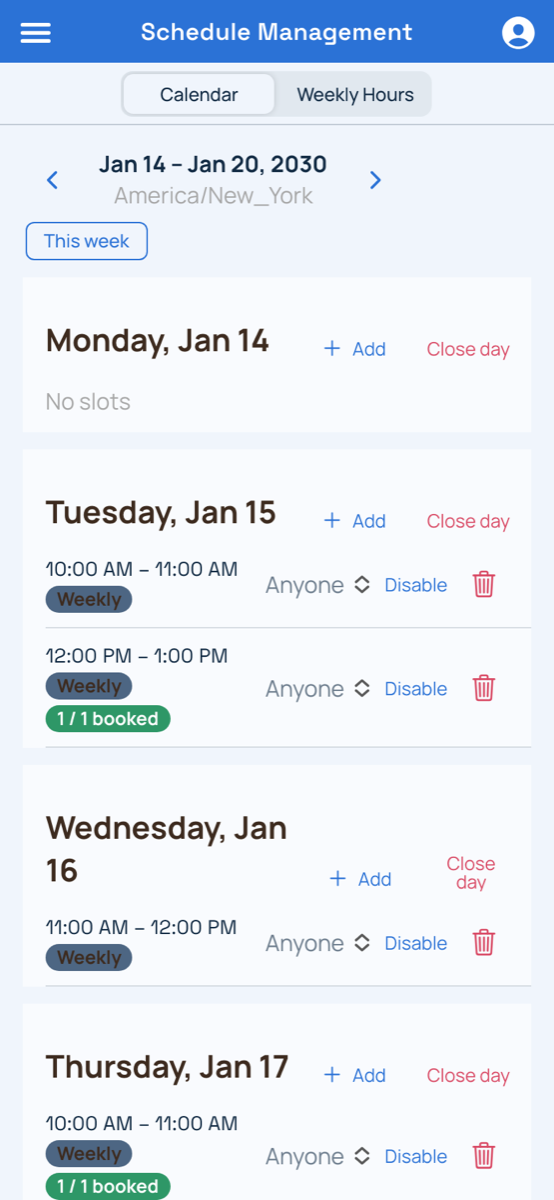
- Calendar and weekly views of every open and booked time
- Split each block of hours into appointments of the length you choose
- Control how many weeks ahead shoppers can book
- Manage more than one location from a single login
Setup guide
Setting up your boutique
Most shops are ready to take bookings in under an hour. Here's what to expect.
-
Tell us about your shop
Get in touch with your boutique's name, location, and the email of whoever will manage it. We'll create your store on ShoppeTyme and make that person its administrator.
-
Sign in and fill in your storefront
Sign in at app.shoppetyme.com with that email and open Retailer Settings. Add your description, address, phone, email, website, and the services you offer (styling, alterations, and so on). Upload a logo or photo so shoppers recognize you.
-
Add your team
Have each stylist create an account at app.shoppetyme.com first, then add them by that email in Employee Management. Mark managers as Administrator so they can change hours and assignments; everyone else gets a read-only view of the schedule.
-
Set your weekly hours
In Schedule Management → Weekly Hours, set your store's time zone and enter the hours you take appointments each day, then choose a slot length to split them into. Copy one day's hours to others in a tap, and set how many weeks ahead shoppers can book. Open times are created for you.
-
Fine-tune the calendar
Use the Calendar view for exceptions: add extra slots for a trunk show, remove a slot when you're short-staffed, or assign specific staff to a time.
-
Go live and welcome your first VIPs
Your boutique now shows up for shoppers. When someone books, assign a stylist, reply in the appointment's message thread, and mark how the visit went. Open your boutique's page at app.shoppetyme.com in a browser and share that link on social media and at the register to get the word out.

Before you start
What you'll need
- A ShoppeTyme account for each person on your team (they sign up with their own email)
- Your regular appointment hours for each day of the week
- How long a typical appointment runs (for example, 45 or 60 minutes)
- A short description and list of the services you offer
- A logo or storefront photo
FAQ
Boutique questions
What does it cost?
We're onboarding boutiques now. Get in touch and we'll walk you through current pricing.
Do my employees need their own accounts?
Yes. Each team member signs up at app.shoppetyme.com with their own email before you add them, so appointments and messages can be assigned to the right person.
Can I still take walk-ins?
Of course. You decide which hours are bookable, and you can remove individual slots any time.
I have more than one location. Is that a problem?
Not at all. Each location gets its own hours, staff, and storefront, and you can switch between them from one login.
What if I need help?
Retailer administrators can open a support request right from the app, and we'll get back to you.
Ready to bring your boutique to ShoppeTyme?
Send us your shop's name, city, and the best email to reach you. We'll get you set up.